
When a customer asks to be forgotten: what UserTell does, step by step
A customer asks you to delete their data. You click Erase personal data in Shopify, and the request travels on to UserTell. Here's what happens next, from checking that it's real to the one email that lands in your inbox.
Key takeaways
- When you click Erase personal data on a customer's profile in Shopify, the request also goes to every app you've installed, including UserTell.
- UserTell checks that each request really came from Shopify, then finds that customer's records by exact email address and order, so nobody else's data gets caught up.
- Behind-the-scenes records, like review reminders, are cleared right away. Posts and comments are your storefront content, so you get one email listing them, with links and the date to finish by.
- If the customer turned off gallery emails, UserTell keeps that choice, so content you decide to keep doesn't start emailing them.
- 48 hours after you uninstall, UserTell deletes all of your store's data. Only your chat history with our support team is kept.
A customer asks you to delete their data
Say a customer named Alex bought a candle from your store back in March and posted a photo of it in your gallery: a reading nook, a pile of books, the candle on the windowsill. A few weeks later, Alex left a comment under another shopper's photo too.
Today Alex writes in: please delete my personal data.
You open Alex's profile in your Shopify admin, click More actions, and choose Erase personal data. Shopify takes care of its own records, and it also passes the request on to every app you've installed. That includes UserTell, which has Alex's photos, name, email address and comment.
Because Alex's last order was more than six months ago, Shopify waits 10 days and then sends the request on. For a customer who ordered more recently, it waits until six months have passed, so open orders and returns can finish first. Once the request reaches UserTell, the 30-day clock starts.
Here's what UserTell does with it. Most of it happens without you. The part you see is one email that tells you what's done and what's left.
First, we make sure the request is real
A deletion request can wipe things out, so UserTell checks it before doing anything.
Think of each request as a sealed envelope. Shopify seals every request it sends, and only Shopify and UserTell can make or check that seal. If the seal doesn't check out, the request goes no further.
UserTell also goes by what's inside the seal, not the label on the outside. Which store the request is about, and what kind of request it is, both come from the sealed part. If the label and the contents disagree, the request is ignored. So nobody can take a real request about one customer and relabel it to wipe out your whole gallery.
Then we find what's Alex's, and only Alex's
Next, UserTell looks through seven kinds of records it keeps for your store: gallery posts, comments, review reminders, discount codes earned for posts, auto-approve lists, email preferences, and orders that came through the gallery.
It searches by Alex's email address and by the orders listed in the request. So a review reminder for one of Alex's orders turns up even if it went to a different address.
The matching is exact. Capital letters don't matter, so [email protected] is still Alex. But [email protected] is someone else, and their records stay untouched. A near-match could sweep up the wrong person's photos, so UserTell doesn't accept one.
Posts are found whatever their status, including ones you rejected and never published. They're still stored, so they count.
Behind-the-scenes records are cleared right away
Some of what UserTell keeps about Alex isn't anything a shopper sees. It's bookkeeping: a review reminder scheduled for Alex's order, Alex's address on a gallery's auto-approve list, Alex's email on the record of a discount code they earned.
There's nothing to decide about these, so UserTell clears them immediately. The reminder and the auto-approve entry are deleted. The discount record stays, but without Alex's email address on it.
Posts and comments are your call
Alex's photos and comment are different. They're content on your storefront. You approved them and may have featured them, and you might have a reason to hold on to something for a while, like an open dispute or a record you're legally required to keep. That's a decision for you, not for an app.
So UserTell sends you an email with the deadline right in the subject line: Action needed by 2026-11-20: customer data deletion request. It lists each of Alex's posts and comments, each with a link to the gallery screen where you can deal with it. Posts link to the gallery's post list, comments to its comments page. The email also says what's already been cleared, so you only have to think about what's left.
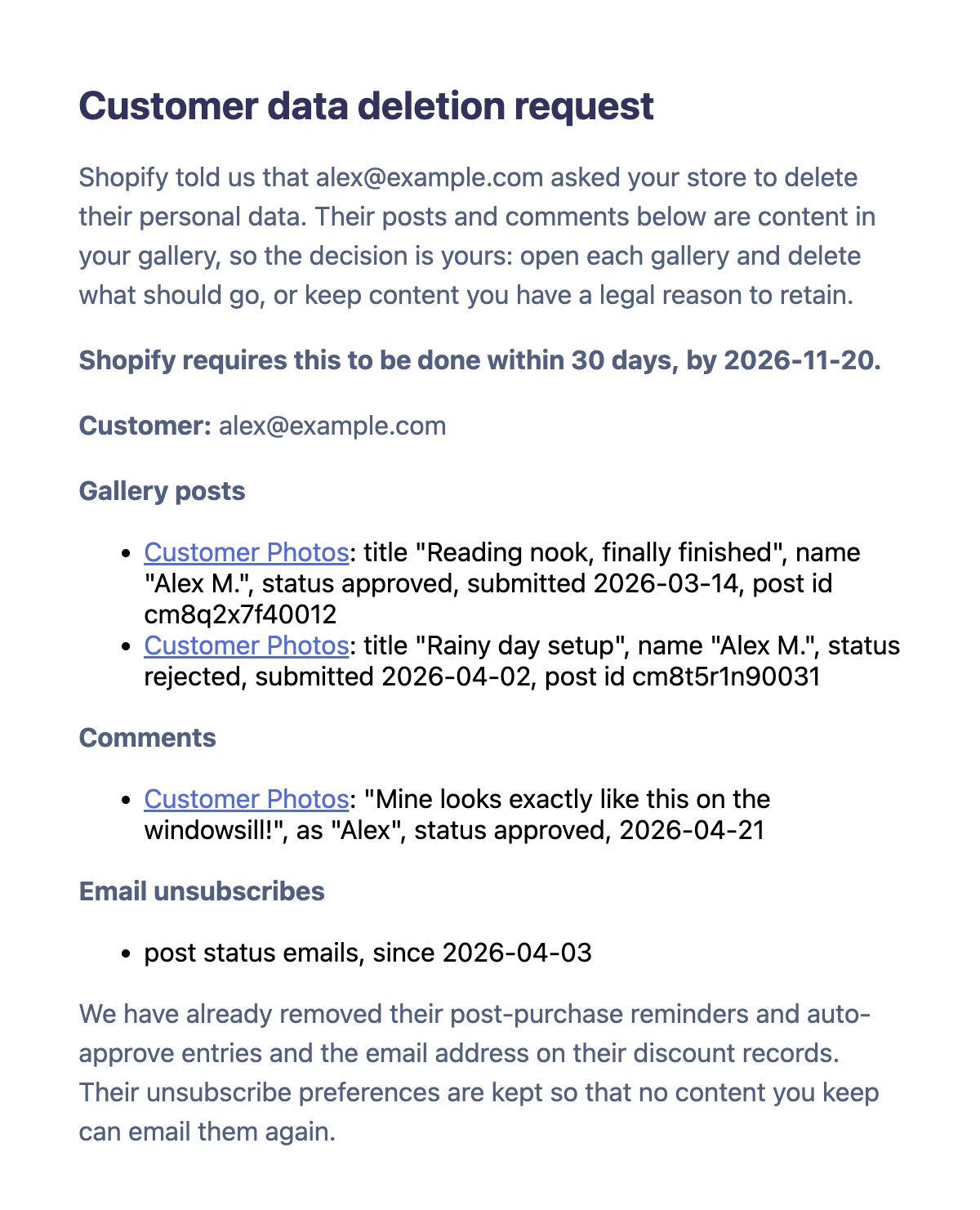
If Alex had never posted or commented, there'd be nothing for you to decide, and no email. Everything else would already be done.
One thing we keep on purpose
After a deletion request, UserTell keeps one thing: any choice Alex made to stop getting emails from your gallery.
That sounds backwards, so here's an example. Say you keep one of Alex's posts for now and approve it later. Approving a post can email the person who sent it, and Alex turned those emails off back in April. If UserTell had deleted that choice along with everything else, it would have no way of knowing not to email Alex. Keeping that one record is how it remembers.
When a customer only wants a copy
Sometimes a customer wants to know what you hold about them, without deleting anything. In Shopify, that's More actions → Request customer data on their profile.
UserTell runs the same search and sends you one email listing everything it found, grouped by type, with links. Shopify expects the answer to come from you, so the email is written for you to pass on with the rest of your reply. If UserTell holds nothing about the customer, you won't get an email.
When you uninstall
48 hours after you uninstall UserTell, Shopify sends one last request: delete this store's data.
By then the app's access to your store has been switched off, and the standard way of checking a request can stumble on that. UserTell checks the seal itself, so even this last request is verified before anything happens.
Then UserTell deletes everything it has for your store: galleries, posts, comments, likes, review reminders, discount records, gallery analytics, email logs and your contact details. It doesn't assume that deleting a gallery cleaned up everything under it. It goes through every place your store's data can live, so even something left behind by an earlier interruption is removed.
The one exception is your chat history with UserTell support. That's a conversation between you and us, and keeping it means we can still help if you come back.
If something breaks halfway
Clean-up jobs can get interrupted by a timeout or a dropped connection. Every step UserTell takes is safe to run twice. If something fails partway, UserTell tells Shopify, Shopify sends the request again, and the second run finishes what the first one started.
Shopify occasionally delivers the same request twice. You still get one email, not two. And if an email ever fails to send, it's flagged in our logs so it can be sent by hand. The 30 days are running either way.
What's left for you
Not much:
- Watch your store email. These emails go to the address Shopify uses to contact you about your store, so make sure someone reads it.
- Act before the date in the subject line. Open each link, delete what should go, and if you keep something, note why.
- Check copies outside the app. Photos customers upload are also saved in your Shopify admin under Content → Files, and deleting a post doesn't remove its file there. Delete those too, along with any copies you've used in ads, emails or social posts.
If you're not sure whether you need to keep something, ask whoever handles legal questions for your store. Our privacy policy covers what UserTell collects in the first place, and our post on collecting photo consent covers the start of a photo's life in your gallery.
Most months, none of this will cross your desk. When it does, you'll get one clear email: what's done, what's left, and when it's due.